


Pros
- Huge image sensors
- Great image quality
- Great low-light performance
Cons
- No replaceable lenses
- Compatibility and availability concerns
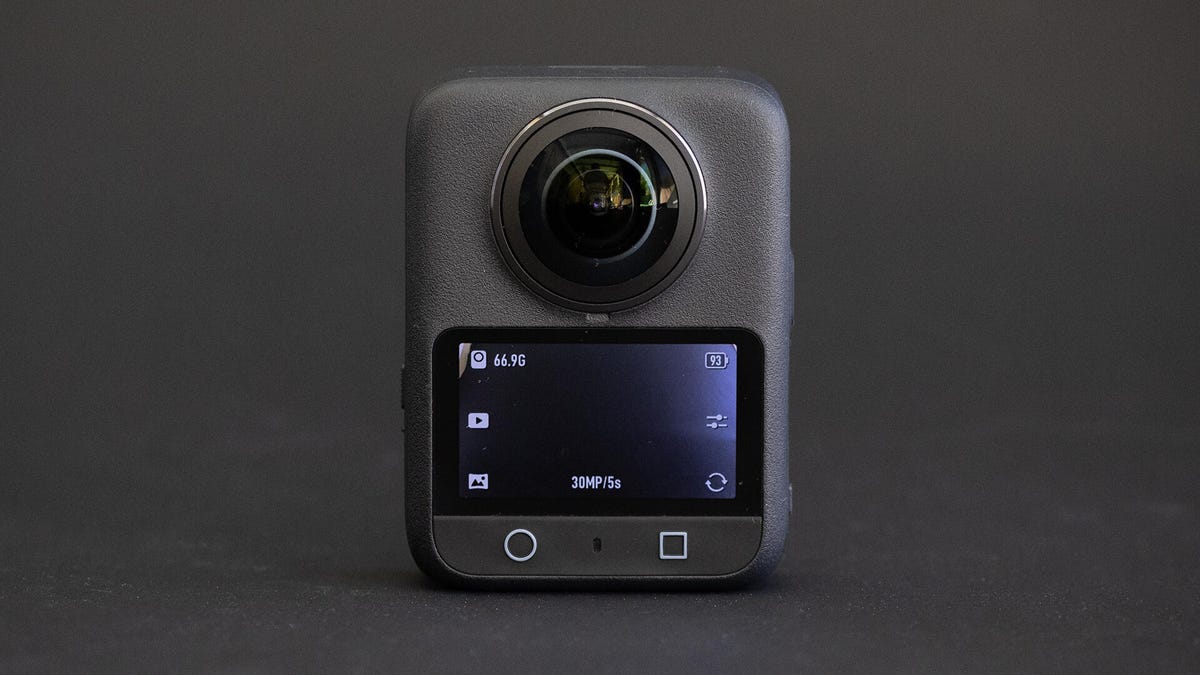
The DJI Osmo 360 is an impressive 360 camera that’s capable of 8K video at 50fps, 120-megapixel images (15,520×7,760) and thanks to its large, square 1/1.1 image sensors, it can record in low light. These headline specs are as good, if not better, than Insta360’s flagship camera, the X5.
In practice, the Osmo 360 performs similarly to the X5 and, in many situations, better than GoPro’s Max 2. The main issue with the camera isn’t technically the camera itself; it’s DJI, and its relationship with Google and the US Government. The DJI Mimo app isn’t available on the Play Store, and the FCC has made recent rulings about drones that affect DJI’s camera sales in the US. You can still get the Osmo 360; it was approved before the ban, but this adds a certain level of uncertainty that GoPro and Insta360 products don’t have.
So overall, the Osmo 360 is a great camera, with picture quality similar to Insta360’s X5, but for Android users and anyone who isn’t invested in the DJI ecosystem, the X5 is the easier choice.
DJI Osmo 360
| Photo resolution | 120 megapixel (15,520×7,760) |
|---|---|
| Video resolution | 8K50 |
| Sensor size | 1/1.1-inch (x2) |
| Lens | f/1.9 |
| Screen type | 2-inch OLED touchscreen |
| Storage | Internal (128 gigabytes), microSD |
| Weight | 183g (6.5oz) |
| App | iOS/Mac/Windows/Android (sort of) |
The Osmo 360 has some impressive specs. It meets or beats what is available in Insta360’s X5, GoPro’s Max 2 and even Kandao’s QooCam 3 Ultra. Being able to do that in a body that’s only slightly larger than the Max 2 and a price that’s around the same as the others is definitely impressive.
To start, the 1/1.1-inch sensors are some of the largest you can find in a consumer 360 camera. Larger than the X5’s 1/1.28 and far larger than GoPro’s 1/2.3-inch. They’re paired with a fast lens, too, at f/1.9, so it’s unsurprising that the Osmo 360 does well in low light.
The photo and image specs are impressive, too. Other cameras max out at 8K30 for video and 96 megapixels for photos, and the Osmo 360 can do more frames per second and higher-resolution photos. That doesn’t tell the entire story, though, as I’ll discuss in the next section. If you have the ability and need for such resolutions and framerates, you can get a lot out of this camera.
The Osmo 360 comes with a single-piece silicone lens cover that’s more convenient than GoPro’s 2-piece covers.
There are 105 usable gigabytes of internal storage. That’s not something super necessary in this age of cheap microSD cards, but it certainly doesn’t hurt. The wide 2-inch screen feels responsive in use, and while the X5’s screen is larger and makes it easier to see what you’ve shot, the DJI’s is good enough for normal use, such as to access the camera’s various modes and settings. In addition to a standard tripod mount, the Osmo 360 has DJI’s magnetic grip mount for fast attachment to its accessories. Speaking of cross-compatibility, the 360 uses the same batteries as the Action 6 action camera, so if you’re all-in on DJI, you can use a lot of the same gear as well as the same app.
Ah yes. The app. We definitely need to talk about the app. I have a whole section about it below.
Usability and photo quality
None of the images in this section or the next have been modified beyond cropping and standard 360 image processing.
As you’d hope from the impressive hardware, the images and videos from the Osmo 360 look great. They’re bright and vibrant, arguably too vibrant. They’re somewhere between the contrasty GoPro look and the brighter Insta360 look. You can enable a manual mode to dial in the exposure, shutter speed and white balance. Even with everything set to auto, the image quality is good, if a little overexposed. If only one lens is facing the sun, the camera will struggle to get an accurate exposure, leading to a noticeable stitch line between the hemispheres. However, this is something all 360 cameras struggle with to greater or lesser degrees.
The same image as above in equirectangular panoramic form. Normally you’d just select the section of the image you want to show and not share them directly like this.
While 8K50 video and 120-megapixel images are certainly eye-catching specs, the reality is a bit more nuanced. Most people will never use 8K video for the simple reason that most phones can’t edit it. So, unless you plan on using your computer for editing, the 8K videos will be useless. This is true for Insta360 and GoPro’s 8K video as well. The actual, usable maximum resolution of these cameras is 6K60 for the Osmo 360, 5.7K60 for the X5 and 5.6K60 for the Max 2. In practice, this means that you can zoom in slightly more with the DJI, but it’s not a meaningful difference in the real world.
Processed with DJI’s Studio app.
The same is true for the 120-megapixel photos, which seem impressive, but just like the high-resolution mode on the X5, the images don’t look much better than the lower-resolution modes. In fact, in some situations, they can look worse because you lose HDR. So it becomes a question of “better” pixels versus more pixels. For what it’s worth, I’ve been using 360 cameras from the beginning, and I basically never use the max resolution mode for photos, not the least because some phones balk at massive images like that and might require desktop software to edit correctly or even just open them.
Processed with DJI’s Studio app.
Low-light situations have long been difficult for 360 cameras. The Insta360 X5 was the first one I’ve tested that’s been able to capture usable footage at night or in dark spaces. The Osmo 360, with its marginally larger sensors and marginally faster lenses, is able to record… about as well in low light. The results are more similar than they are different. In fact, most likely due to the X5’s image processing, its low-light captures tend to have less noise. Which is to say, beyond the specs, the results are similar. Both are good, at least compared to other 360 cameras.
As far as broader usability aspects go, the OLED screen looks great, the camera turns on and navigates menus quickly. Overall, it feels like a solid, well-made camera.
The app and global politics
Processed with DJI’s Studio app.
I wish I could judge the Osmo 360 camera as just a camera, but that’s not the world we live in. For reasons far beyond my interest in writing about it, the US government has restricted the sale of drones from certain companies, and tied up with that are some cameras. Products approved by the Federal Communications Commission before the ban went into effect, like the Osmo 360, are still available for sale. It’s impossible to say what will happen in future days, weeks or whenever. Does that directly affect the Osmo 360? Not exactly, but to me it’s still something to consider. How much of a factor it is in your calculations is entirely up to you.
Processed with DJI’s Studio app.
The more direct issue is that Google also has an effective ban on DJI. The DJI Mimo app, which is required to use the camera, is not available on the Google Play Store. In order to use it, you have to go to DJI’s website, disable security protections on your phone and download an APK that contains the app. This is probably fine, but Google blocks the Mimo app for some reason, and this bypasses that. I don’t think DJI is up to anything nefarious, but Google sure seems to think so, and one of us is a multibillion-dollar global conglomerate, and the other writes books about how easy it is to travel when you’re broke. So again, feel free to do your own calculations on that one. Apple doesn’t seem to have a problem with DJI, however, and you can get the app if you’re on iOS.
A screengrab from an 8K50 video captured using DJI’s Studio software.
The app itself is generally decent. It has the same editing functions as Insta360 and GoPro, letting you choose the angle of view, speed and so on. You can even edit multiple 360 clips together into a longer video. However, I regularly had issues trying to load the app at all. It would hang on the loading screen, and neither waiting nor force-closing it would solve the issue. I can’t even tell you what worked, as I’d give up, check it later and it would open fine. So maybe there’s some loading or something happening in the background, but without any visual indication of that, it just seems like the app doesn’t work. I also got occasional error messages in Chinese. I hope they weren’t important.
There’s also the DJI Studio desktop software for editing 360 photos and videos. It does most of what the mobile app does, but in a more streamlined way. I also got slightly better results with photos using the desktop software, with a bit more detail and fewer jagged diagonals.
Impressive hardware, but…
There are a few simple, declarative things I can say. Competition is good. DJI makes some good cameras. The Osmo 360 is a good 360 camera. I can also say the Osmo 360 takes great-looking photos and videos, and it does so in a compact, easy-to-handle form.
If I judge these 360 cameras solely on the hardware in hand, I’d be hard-pressed to say whether the Osmo 360 or the Insta360 X5 is better. While the former is technically capable of higher framerates and photo resolutions, for most people, that difference won’t be noticeable. Not least because their phones can’t handle 8K video anyway, and for sharing to social media, the extra resolution is rarely going to make a huge difference.
Professional content creators — especially those who’ve already invested in the DJI ecosystem by buying batteries, mounts and so on — might be able to get some shots with the DJI that they couldn’t with the X5. However, the X5’s user-replaceable lenses should absolutely be considered a major factor in its overall package. So, even beyond the nonsense I’ll get to next, I’d still say most people should probably get the X5, if for no other reason than the fact that everyone inevitably drops a 360 camera, and they always seem to land face-down.
The nonsense has to be part of the conversation, though. I wish it weren’t, but so it goes. Since the Osmo 360 is available for sale, the FCC ban isn’t an issue. (Note, though, that DJI has said that if repairs are necessary, it may take longer than usual as getting parts into the US is more difficult than it once was.) Some people won’t care that they need to disable security features on their phone to download an app. But I wouldn’t tell my parents, for instance, to do that, so I can’t in good conscience say it’s fine for anyone. Your comfort level with the idea should definitely be a factor, especially since there are two other excellent 360 cameras available that don’t have this issue.
In other words, the Osmo 360 has some great hardware and is a worthy competitor to the Insta360 X5 and GoPro Max 2. But there’s a big asterisk at the end of that statement, which leads to 1,000 words of fine print that basically says, “It’s complicated.”
Read the full article here