


You can’t preorder the iPhone Duo until Oct. 16, but beware of a fake ad out there that says otherwise. Falling for it could expose a lot of personal and financial data and could even lead to theft of your cryptocurrency, if you have any.
The sleuths at Malwarebytes spotted the scam, which tries to trick people into thinking they can save $500 by preordering the iPhone Duo, Apple’s first foldable phone. However, Apple has already said the Duo won’t be available for preorder until Oct. 16 and won’t go on sale in stores until Oct. 23.
The cybertheft uses the DarkSword exploit chain, which targets older iPhones that don’t have the latest security and software updates. DarkSword can compromise a device and steal data even if you simply visit a malicious web page. You don’t even need to click on or type anything to be victimized.
Malwarebytes told CNET that the iPhone Duo scam targets iPhones running iOS 18.4 to 18.6.2 and that its exploit code contained no iPad or Mac entries.
The DarkSword exploit begins as soon as the scam page loads onto your browser. The page appears legit for the most part. It’s got the Apple logo, font and language style, and there aren’t any spelling, grammar or punctuation mistakes typical of most web page scams. It’s even got an Apple copyright at the bottom. But, as Malwarebytes points out, the privacy, terms and sales policy links go nowhere.
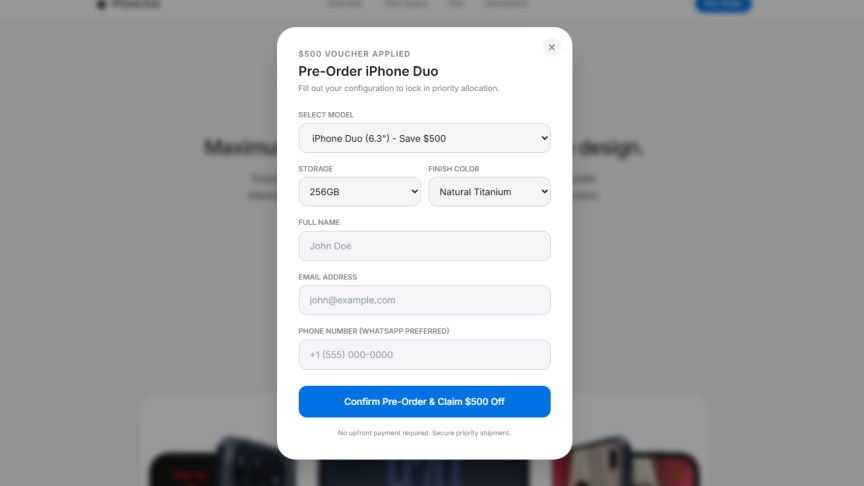
Clicking the “Claim $500 Voucher” button takes you to a submission form with a few telltale indicators that it’s a scam, according to Malwarebytes. The finish color menu lists natural titanium, although the iPhone Duo only comes in star white and night sky. The form also lists size options of 6.3 and 6.9 inches, which are incorrect — the phone is 7.6 inches unfolded and 5.4 inches folded.
Filling out the form is meaningless, Malwarebytes said. If you do fill it out and submit it by clicking on the blue button, you’ll get a “Pre-Order Successful” message. By that time, however, the data theft on your iPhone has already begun.
The payload — the malicious code that does the stealing — goes after your passwords, messages, call history, contacts, voicemail, email, photos, app info, cryptocurrency wallet data and Apple Notes.
If you’re using a browser other than Safari, the default browser on Apple devices, a “Browser Restricted” page will direct you to open Safari, which DarkSword uses to infiltrate the device. If it can get past the iPhone’s security protections, it will begin stealing data.
How to avoid this scam
Apple says that devices running the latest versions of iOS 15 through iOS 26 are already protected. To make sure your iPhone is running the latest iOS update, go to Settings > General > Software Update. If your phone allows, install the most updated version of iOS 26 (with iOS 27 coming soon). While you’re there, also turn on Automatic Updates. An Apple support page gives more details on how to protect your iPhone from web attacks.
Also, if you’re interested in iPhone Duo preorders, only go to Apple’s official store website or other reputable online stores, such as Best Buy or your cellphone carrier. (We have a handy list here.) Don’t be tempted by ads, texts or social media posts that offer preorder deals and ask you to click a suspicious URL.
Tech companies must fix security flaws quickly, as Apple has done with DarkSword, but users must also do their part, said Stefan Dasic, a senior malware research engineer at Malwarebytes.
“We live in a time where staying safe means keeping up with technology,” Dasic told CNET. “Skipping a security update is like being handed a free replacement for a front-door lock that burglars already know how to pick, and leaving it in the box.”
Read more: 5 iPhone Duo Features I’m Already Dying to Try
If you accidentally clicked…
OK, stuff happens. If you fell victim to this scam, update your iPhone, then restart it. Malwarebytes said the data-stealing payload does not return after the phone is rebooted. There’s nothing you can do about data that was stolen before the reboot.
Malwarebytes listed several other things to do. If you have a cryptocurrency wallet on your iPhone, create a new one with a new recovery phrase and move the funds to it. If you have a crypto exchange account, secure it and contact the exchange.
Read more: A Reality Check From a Fold-aholic
Change passwords that might have been stolen. Go to a trusted device and change passwords for your email accounts, Apple account and banking, crypto and other financial accounts. And activate two-factor authentication or even more than two factors.
Scam Guard and Browser Guard, both available from Malwarebytes — a cybersecurity suite highly rated by CNET — can spot scammy screenshots and links and block fake webpages from appearing on your internet browser.

See full bio
Read the full article here